Memoir Writing: No. 4 Organization by List Making

All right. By this time, you have wallowed in your boxes of memories, started taking notes, concluded that you need a consistent note-taking software, platform or notebook.

Now what? As in, what do you do with all those notes?

Files Boxes-Stacked

Three of seven boxes of memorabilia that had to be entered into lists for my memoir, “Hidden War.”

Easy. Make lists.

  • Chronology — Your most important list. Everything flows from this. Everything refers back to this. Your memoir does not have to follow this religiously, but you must have it and know that you can rely on it. That is, you know everything on it is true and accurate, to the best of your knowledge and ability.
  • Names — What? Who needs a list of names? You can remember the name of every person you’ve ever met. Fine. Keep the list anyway. And make sure you know that it’s Aunt Ida, not Aunt Ada. Or in my case, Aunt Bernice. Only in my case there were two Aunt Beas, both with the same last name. One was Big Aunt Bea, because my mother’s aunt was older and larger than Little Aunt Bea, my mother’s sister who was also called Ditz. (Don’t go there.)
  • Places, otherwise known as maps.
  • Books, articles, newspaper clippings, AKA Bibliography.

Why all the lists? Because you can’t remember everything, and you don’t want to even try. You want to rely on your lists.

For that reason, anything that goes into a list must be fact-checked and completely accurate … OR LABELED AS UNVERIFIED.

We will add other lists later, but for now, these are the keys to organizing all those memories.

BTW, this process took me about 42 years with many starts, stops and interregna. That’s why ACCURACY IS KEY. (Yes, I know I’m shouting. I’m doing it because you don’t believe me and aren’t paying attention.) You don’t want to have to go back and start over checking every list entry to confirm that it’s accurate.

In the next step, we start writing. Sort of.

Memoir Writing: No. 3 My Indispensable Tool

When I was writing HIDDEN WAR: A Memoir of America’s Secret Crusade in Laos, I was working from a large number of sources:

  • Two hand-written journals kept in spiral notebooks
  • More than 50 rolls of black and white film scanned into digital files
  • Hundreds of letters, most hand-written
  • Course evaluations for my undergraduate degree (Laos was my year abroad that stretched to two years.)
  • Files, notes and course work from graduate school
  • More than 100 books, most in paper versions but including a dozen or so in digital formats
  • Five folio-sized scrap books of newspaper and magazine clippings
  • Files full of carbon copies of articles I wrote
  • Dozens of paper and digital maps of Laos and surrounding countries

It’s no wonder I started and stopped half a dozen times before I finally got it right and finished.

I wrote and edited the manuscript in MS Word, but my notes and everything else I did on Evernote, my indispensable writing tool.

Disclaimer: I am not a shill for Evernote, have never received free software, blah, blah, blah, and I absolutely hate some things about the program.

But I never would have finished the memoir without it, and I use it a dozen times a day to keep my schedule, take notes and leave myself reminders, and pull down content from the Web and social media. Of the 1,250 or so files currently in Evernote, the Laos folder holds 299, including the sample below.

Screen Shot 2016-08-07 at 6.38.13 AM

Evernote grabs and stores research from the Web and displays material in useful sidebars.

Here’s what I like most about it:

  • It works with all operating systems and devices. When I was writing Hidden War, I was working with a Windows PC, an Apple MacBook Pro, an iPad, and an Android cell phone and later an iPhone 6s Plus. Whatever I wrote or stored on one version of Evernote appeared on every other device and platform just fine.
  • It lives on the cloud (see above), but you can store some or all of your files on a particular device. I back up all my files every month and keep a separate backup of the Laos material.
  • It offers lots of options when you want to grab stuff from the Web, including (my favorite) just the content without all the ads and other Web blather.

I suspect it does much more but that’s how I rely on it.

I wrote the original draft of all my chapters on Evernote before combining them on MS Word. That’s my system.

What I hate is the limited formatting options and the worst autocorrect function I have ever used.

Some people swear by Scrivener, but I could never figure it out.

Find your own indispensable writing tool. You’re about to do some heavy lifting.

Rewriting: Synopsis as Reality Check

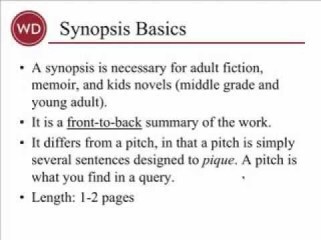
As I rewrite — I mean major, kill-off-characters, change-plot-direction rewrite — the first Demon series book (now entitled The Mark of the Spider), I am struck by how useful it is to write the synopsis as I go along.

Synopsis by Chuck Sambuchino, Writers Digest

Chuck Sambuchino, Writers Digest, 2014

I realize I am including too much background, or backstory, in The Mark of the Spider. Keeping a lot of backstory demonstrates how much I have thought about and researched the background, thus gratifying my ego, but it slows the action.

Not everyone shares my enthusiasm for background, although I’m sure Herman Melville would.

I’m currently stuck at the “muddle in the middle” of the story, and in reviewing the synopsis I realized I have too much thinking going on and not enough action racing along. I need to work out a balance between the two, but I can start work on it now that I understand the need exists.

Lesson learned: Don’t wait until the end to write the synopsis. It can be a handy tool while you write.